Thursday, November 29, 2012

Resetting a forgotten Administrator Password for windows server 2008 R2

  • Boot onto DVD of Windows Server 2008
  • Choose “Repair your computer”
  • Launch cmd
  • Go to D:\windows\system32 //why D? because the system disk is replaced to D :
  • Rename Utilman.exe to Utilman.exe.bak
  • Copy cmd.exe to Utilman.exe
  • Reboot on Windows
  • Do the keyboard shortcut Windows + U when on the logon screen
  • net user administrator Newpass123 inside the cmd
  • log on with the domain admin account and this new pass
  • change the password to remember it if needed
  • Reboot on the DVD to put back the original Utilman.exe
I will have to try this on a domain controller to check the repercussions!!!

P.S.
it works on a domain controller! time to think about windows security??

Wednesday, November 7, 2012

Exchange Storage Architecture

http://technet.microsoft.com/en-us/library/bb124808%28v=exchg.65%29.aspx

RPC Server Unavailable!!!

One of my clients had a DC in one of the branch sites which dose not recieve replications. I was able to resolve the DNS issues it had and get the zone up and running on the server but AD Replication issue still prevails.

When a replication is forced from AD sites and Services console, it gives out the following error..

I came across this valuable artical on technet while i was on a quick lookout on web. Gotta try these out and check why it goes wrong!! will post my findings soon!

Click here to view the article.

Thursday, August 23, 2012

A Quick view on Dynamic Access Control in Server 8

Hi Guys,

This is a great video which gets Dynamic Access Control in a nutshell. Pretty impressive feature which gets file classification to the next level where the files gets classified depending on the contents!! and isolating the location of the file from classification equation making the life easier for users as well as administrators leveraging centralized management capabilities of the AD!!!

Check the video!


Friday, August 17, 2012

Windows Server 2012 installation Options

Hello mates,  in this post, we will be looking into the installation options of windows server 2012. Server core and full scale installation was available to us since server 2008. But with Sever 2012, the ability to change between the core and full installation and vice-versa without a reinstallation was made available.

Why to and fro?
As we all know, installing the server core reduces attack surface and increase the performance of the box. But with the command prompt available as the only interface for the server, sometimes it can be a cumbersome process to make configurations and so on. With the options available to switch between the core and full installation, GUI becomes a complete toolkit to be used only when needed. 

All right! we start with a Full installation.

Open up a PowerShell console and  type the following command.
uninstall-windowsfeature Server-gui-mgmt-infra –restart

pwrshell

the uninstallation of the GUI will then begin..

remove

Upon the reboot, you may notice the avatar has gone!

startup

When you log in, a command prompt window will greet you. you may use command prompt, windows PowerShell and Remote Server Administration Toolkit to manage and make further configurations.

To revert back to the GUI fire up powershell and enter the following command.
INstall-windowsfeature server-gui-mgmt-infra,server-gui-shell –restart

reinstall

GUI installation will then start and upon completion the server will reboot. Note the the avatar back in the log in screen. Full version of the server will be available without any issue.

log2

Apart form this, “Minimal Server interface” is also available, which is similar to the full installation but without Internet Explorer, Windows Explorer, Desktop and start screen. Microsoft Management Console (MMC), Server Manager, and a subset of Control Panel are still present.
Starting with a Server with a GUI installation, you can convert to the Minimal Server Interface at any time using Server Manager.
Go to server manager> manage> remove roles and features and untick server graphical shell.
 
minimal

Apart from this check this technet article to find details on features on demand and converting an installation to Full version which was installed initially as Server Core.


Wednesday, February 22, 2012

CODEx applications warning when installing Exchange 2007 SP3

I came across this warning during the prerequisite check for an exchange 2007 SP3 installation on a Windows Server 2008R2 Based domain.


No Big deal!
but to use the Collaboration Data Objects for Exchange 2000 Server (CDOEX) feature correctly on Windows Server 2008 R2, a registry key permission must be changed. An administrator has to change the value of the registry key during the Exchange Server 2007 SP3 installation process. A Windows update is released to fix this problem.

A complete description of the update involved can be obtained from http://support.microsoft.com/kb/982720  and

What are CDOEx Applications?

Colloboration Data Object Model for Exchange provides the fundamental Component Object Model (COM) classes and interfaces that are used to manage the Exchange store.

CDOEX can only be run on a computer on which the Exchange Administrative Tools have been installed. The computer running the CDOEXM application and the computer running Exchange must be in the same Active Directory organization.


Thursday, February 9, 2012

Wake On LAN!!!

Okay..I was trying to resolve an Outlook issue of one of my remote clients, and busy reading some online articles when i lost the remote connection to the computer. My monitoring system showed teh PC had gone offline! the user being a difficult one, I wanted the PC online before my client starts work in the morning. I tried the Wake up from LAN on my monitoring software but no! it did'nt work!

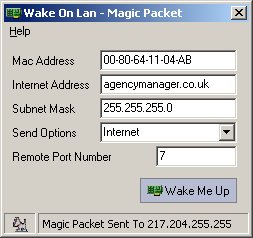
While googling for another wake-up-from-LAN app, i came across a handy little tool :) on http://www.depicus.com : WakeOnLANgui. did it work for my client? no! but it worked for my test lab!

It's a really small exe where you can download and run. 


What you should have:
  1. Wake On LAN enabled in the NIC  and BIOS.
    This is easy! You can enable this function in NIC settings or the management application that came with it!
    NIC integrated to your mainboard? Enable WOL on BIOS.
  2. MAC address of the target computer
 

Here's what to do..
  1. Check whether the network adapter on the target computer supports Wake On LAN.
  2. Download and install WakeOnLanGui from www.depicus.com.
  3. Run WakeOnLanGui on the computer from which you have access.
  4. Type the physical address into the proper field. The other two fields are filled with 255.255.255.255, and the port is 7 or actually any other port. Port 9 is sometimes used.
  5. and Wake Me UP!!!


Why this did not work on my client? simple! I found WOL is not enabled from her BIOS...

Did I manage my client
? well.. we'll see that in the morning!