Okay..I was trying to resolve an Outlook issue of one of my remote clients, and busy reading some online articles when i lost the remote connection to the computer. My monitoring system showed teh PC had gone offline! the user being a difficult one, I wanted the PC online before my client starts work in the morning. I tried the Wake up from LAN on my monitoring software but no! it did'nt work!
While googling for another wake-up-from-LAN app, i came across a handy little tool :) on http://www.depicus.com : WakeOnLANgui. did it work for my client? no! but it worked for my test lab!
It's a really small exe where you can download and run.
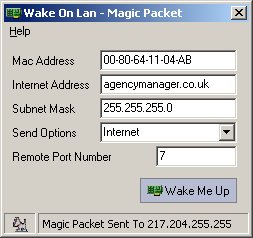
What you should have:
- Wake On LAN enabled in the NIC and BIOS.
This is easy! You can enable this function in NIC settings or the management application that came with it!
NIC integrated to your mainboard? Enable WOL on BIOS. - MAC address of the target computer
Here's what to do..
- Check whether the network adapter on the target computer supports
Wake On LAN.
- Download and install WakeOnLanGui from www.depicus.com.
- Run WakeOnLanGui on the computer from which you have access.
- Type the physical address into the proper field. The other two fields are filled with 255.255.255.255, and
the port is 7 or actually any other port. Port 9 is sometimes used.
- and Wake Me UP!!!
Did I manage my client? well.. we'll see that in the morning!

No comments:
Post a Comment